Features
Nine areas, in the order they matter. Each one says what works, what does not, and which privilege mode you need for it.
| At a glance | |
|---|---|
| Minimum Android | Android 9 (API 28) |
| Targets | API 37 for targetSdk, API 37 for compileSdk |
| Licence | GPL-3.0-or-later |
| Languages | English, Arabic, Chinese (Simplified), French, Polish, Portuguese, Portuguese (Brazil), Spanish |
| Network access | foss: one surface only — the optional Extension Store. store also links Google Play Billing |
| Trackers, ads, telemetry | None |
Privilege engines
Thor never talks to the system directly. Every privileged action goes through one SystemGateway
interface with three interchangeable implementations, so a feature either works in your chosen mode
or fails honestly. It never silently does something different.
Three ways to grant power
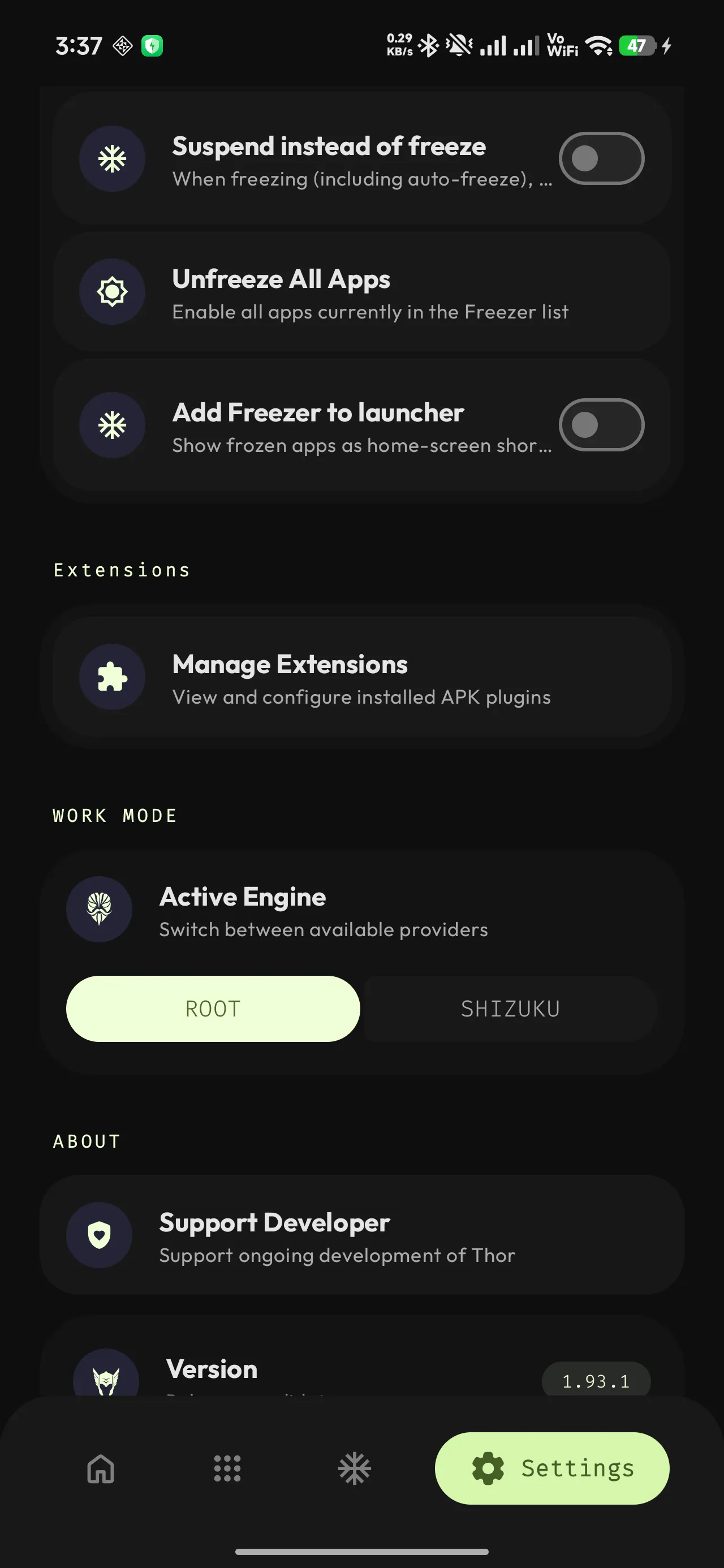
Root — Thor talks to your root shell through Odin, its own maintained fork of libsu. Works with Magisk, KernelSU, KernelSU Next and APatch. Your root manager shows the usual grant prompt the first time.
Shizuku — no root required. Install the Shizuku app, start its server over ADB or wireless
debugging (Android 11 and newer can pair without a computer), then grant Thor permission when it
asks. Thor runs as the shell user: everything adb shell can do, Thor can do.
Dhizuku — Device Owner mode, for people who want elevated control on a stock, unrooted,
unpaired device. This is the most demanding setup: the device must have zero accounts on it when
you enrol, because Android refuses dpm set-device-owner if even one account exists. Signing into
Google afterwards also breaks it.
Automatic fallback
You can pin a preferred mode in Settings, or leave it on auto. Either way the resolution order is fixed:
Resolution order
your preference (if available) → Root → Shizuku → Dhizuku → no privilegeThor re-probes when Shizuku’s binder arrives and when you answer its permission prompt, so granting Shizuku permission takes effect without restarting Thor. A binder that dies is logged but does not trigger a re-probe. The Work Mode selector only appears in Settings when more than one mode is actually available — there is nothing to choose between otherwise.
What each mode can do
| Action | Root | Shizuku | Dhizuku |
|---|---|---|---|
| Freeze and unfreeze | Yes | Yes | Yes |
| Suspend and unsuspend | Yes | Yes | Yes |
| Force stop | Yes | Yes | Yes |
| Clear cache | Yes | Yes | Yes |
| Clear app data | Yes | Yes | Yes |
| Restrict background activity | Yes | Yes | Yes |
| Uninstall | Yes | Yes | Yes |
| Install and sideload | Yes | Yes | Yes |
| Fix Store (reinstall as Play) | Yes | Yes | Yes |
| Grant and revoke permissions | Yes | Yes | Limited |
| Custom shell for extensions | Yes | Yes | Yes |
| Reboot device | Yes | No | No |
| Show per-app cache size | Yes | No | No |
| Export split APKs | Yes | No | No |
| Disable or enable one component | Yes | Root-mode only | No |
| Force-open a component | Yes | Root-mode only | No |
| Stop a single service | Yes | Root-mode only | No |
Several rows are not uniform, and those are the ones worth stating plainly rather than burying:
- Reboot is Root-only. Shizuku and Dhizuku return an explicit error rather than pretending.
- Cache size reads as 0 under Shizuku and Dhizuku. Measuring it needs
duon the app’s private directory, which only root can reach. The number is honest but useless in those modes. - Split-APK export and privileged file copy are Root-only and fail with “Root required” rather than producing a partial file.
- Dhizuku permission grants can be refused on multi-user devices, because the Device Owner runs
as user 0 and may not hold
INTERACT_ACROSS_USERS. Thor surfaces the real failure rather than silently mutating the wrong user’s copy. - The three component rows are the only ones where “Shizuku” is not one answer. They need uid 0, so a Shizuku started as root can do them and a shell-mode Shizuku cannot — the same app, the same connection, a different answer depending on how its service was started. Component control has the detail.
The hidden-API bypass
Shizuku and Dhizuku need Android’s hidden APIs (IPackageManager, IActivityManager,
IAppOpsService) when a shell command is not enough. Thor unseals them with a small bypass module
built on VMRuntime.setHiddenApiExemptions, scoped to four package prefixes and no more. Root does
not need it at all.
Most privileged actions are shell-first with a reflection fallback, which is why Thor keeps working
across OEM builds that move or remove framework internals. Two exceptions are deliberate: Shizuku
tries reflection first when freezing a preinstalled app, because pm is ordinary userspace an OEM
can lock down while the binder call names its target state explicitly; and Root suspends only
through reflection, never through pm suspend, because a root-shell suspension records the
suspender as a package that does not exist and the paused-app dialog then crashes.
App installer
Thor registers as an installer, so opening a package file from anywhere — a browser, a file manager, another app — hands it to Thor’s bottom sheet. Opening, not sharing: Thor declares no share target, so it will not be in a share sheet, and on Android those are two different menus even when they look alike.
Thor matches on the type the sending app declares, or, when that type is a wildcard, on a filename ending in one of the bundle extensions. A handful of file managers supply neither — Samsung My Files is the one that gets reported, handing over a URI with no name in its path. Opening the file from a different file manager is the fix. For people who would rather not, Settings carries an off-by-default “Show Thor when opening any file” switch; the FAQ says what it widens, and why being that wide is the reason it is not on already.
Every bundle format, handled
| You hand it | Thor does |
|---|---|
.apk |
Installs it directly |
.xapk (APKPure) |
Reads manifest.json, picks the right splits, installs them as one session |
.apkm (APKMirror) |
Extracts every inner APK, base first, installs as one session |
.apks (bundletool) |
Sorts entries base-first and installs as one session |
.apkp |
Recognised as a bundle and handled the same way |
Bundle detection does not trust the file extension alone. Thor looks inside the zip for a top-level
AndroidManifest.xml and for bundle sidecars, so an .apk that happens to contain a nested APK is
not mistaken for a bundle, and a mislabelled bundle still installs.
Install options
- Downgrade — install an older version over a newer one. Requires a privilege mode, and is blocked with a clear message on a plain unprivileged install, because the OS will simply refuse it.
- Play attribution — with Auto Reinstall switched on, a privileged install records
com.android.vendingas the installing app. There is no free-text chooser; the switch is the whole control. - External installer — hand the file to any other installer app instead. This is the escape hatch when you have no privilege and want the system dialog.
- No privilege at all — Thor still installs through the standard
PackageInstaller. You just get Android’s own confirmation dialog, and no downgrade.
Fix Store
Fix Store makes Android believe an app came from the Play Store.
Thor reads the app’s own installed APK paths — the single APK, or every split if it is a bundle —
straight off the device, then reinstalls those exact files with the installer record set to
com.android.vending. Nothing is downloaded and nothing is replaced. It is the same app you already
have, reinstalled from itself with a different name on the receipt.
Why that matters: plenty of apps ask Android who installed them and behave differently when the answer is not Play. Licence verification fails, expansion files will not download, some DRM refuses to start, and some apps simply decline to update. Fix Store makes the system record say what those checks expect.
It works in all three privilege modes. Thor refuses to do it to itself.
Auto Reinstall
Optional. When it is on, Thor watches for package installs and updates and reassigns the installer record to Play in the background — a lighter operation than Fix Store, since it only touches the record and never the APK. It needs a privilege mode, and it skips packages already attributed to Play.
Freezer and debloat
The part of Thor that does the most good and carries the most risk, so it is also the part with the most guardrails.
Freeze, suspend and force-stop are three different things
This is the single most common confusion, so here it is in a table:
| Action | What you see | Survives reboot | How to undo |
|---|---|---|---|
| Force stop | Nothing. The icon is unchanged | No — the app restarts on its next trigger | It undoes itself |
| Freeze | The app disappears from the launcher entirely | Yes | Unfreeze |
| Suspend | The icon stays, greyed out; tapping shows Android’s “app paused” dialog | Yes | Unfreeze |
Force-stop is momentary: an alarm, a job or a push message brings the app straight back. Freeze and Suspend are persistent states. Which of the two Thor uses is a single global Freezer setting.
Under the hood, freezing a user app disables it. Thor normally disables a system app in
place too, keeping its package installed and its data on disk. Some OEM builds refuse to let
Shizuku disable preinstalled packages. Thor’s default-on Shizuku removal fallback can then remove
the app for the current Android user with pm uninstall -k –user N, which keeps its data
files. Unfreeze reinstalls the package. You can turn off this fallback in Settings; a refused
disable then fails rather than removing the app.
The watchlist
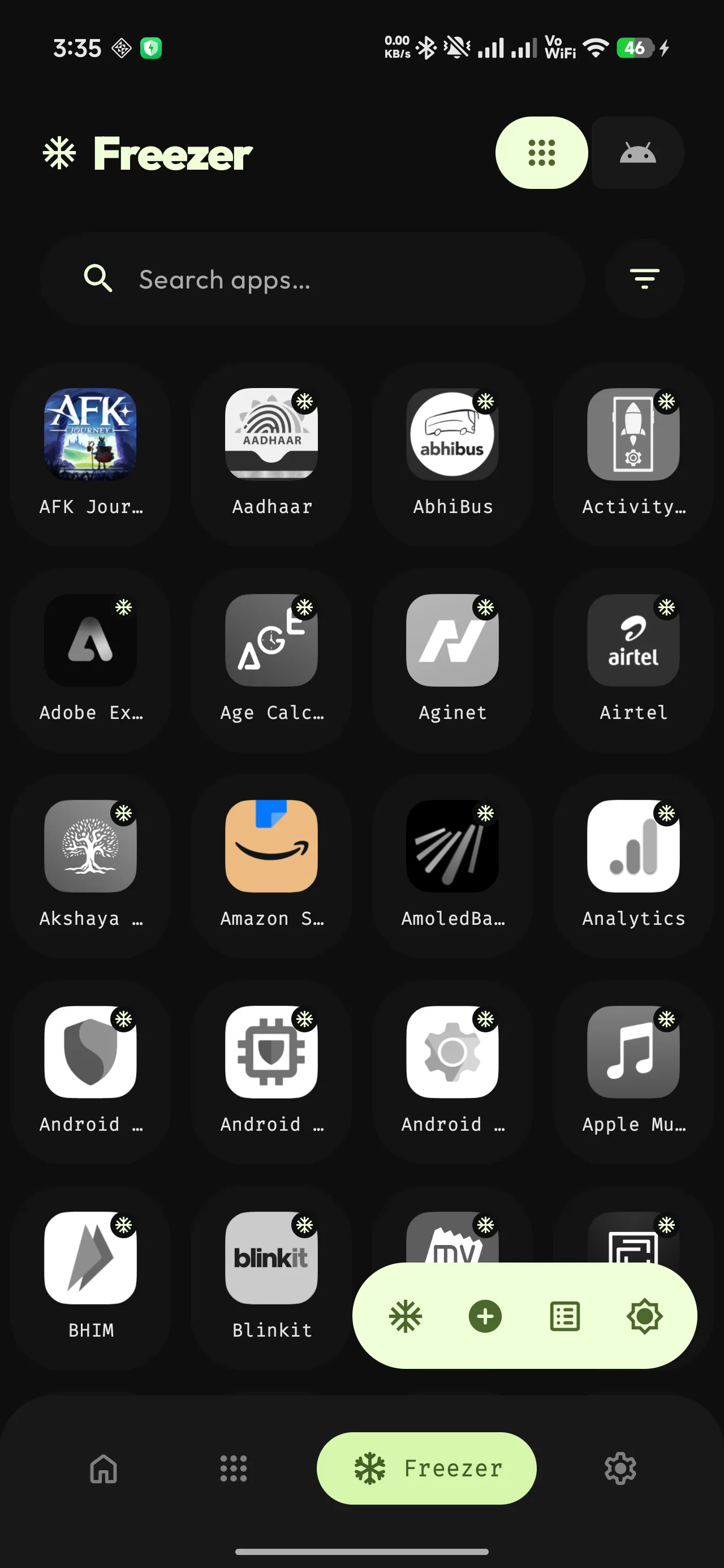
Add apps to the Freezer watchlist, then freeze or unfreeze the whole set in one action from the app, a launcher shortcut, or the Quick Settings tile. Up to five apps are processed at once, with a live progress counter.
Freeze profiles
Named groups of apps that freeze and unfreeze together, independently of the main watchlist. An app can belong to several profiles. Useful for “work”, “games”, or “the stuff that eats my battery on a trip”.
Auto-freeze on screen off
When this is enabled, Thor freezes the whole watchlist as soon as the screen turns off and the lock screen is engaged. The keyguard check is deliberate: freezing apps while you are still using the device would be actively harmful. While a run is still going, further screen-off events are ignored rather than stacked, so rapid on and off cycles cannot pile several batches onto the same privileged shell.
Quick Settings tile
A one-tap freeze in the notification shade. Opening the shade counts how many watchlist apps are currently freezable and shows the number as the tile subtitle; tapping freezes them. The states are Checking, No privilege, Nothing to freeze, Ready and Working. The tile freezes only — unfreezing is done from the app or from a launcher shortcut.
Home-screen shortcuts
Freezing an app makes it vanish from the launcher. That is the point, and it is also the annoying part, because getting back into it means opening Thor, finding the app, unfreezing it, then finding it in the launcher again.
Pin a shortcut instead and that whole sequence becomes one tap.
How it works. From any user app’s info sheet, choose Add to Home screen. You get a normal launcher shortcut carrying that app’s own icon and name — no Thor badge, nothing to learn. Tap it and Thor unfreezes the app and opens it in one motion. There is no dialog and no visible Thor screen; the launching activity is transparent, so what you see is the app coming up.
Some details worth knowing:
- The icon tells you the state. While the app is frozen its shortcut icon is drawn in greyscale. Once it is running again the colour comes back. The grey is not a broken icon — it is the app’s real icon, desaturated.
- It does not re-freeze afterwards. Tapping a shortcut thaws the app and leaves it thawed. If you want it to go back on its own, that is what auto-freeze on screen off is for, and the shortcut icon greys itself again when that happens.
- It works on unfrozen apps too. If the app is not frozen, the shortcut just launches it, with no privileged call at all.
- Any user app can be pinned. It does not have to be on the Freezer watchlist. System apps cannot be pinned this way.
- Two bulk shortcuts are available as well, Freeze all and Unfreeze all, which act on your whole watchlist. They sit on the same long-press menu as Thor’s own icon and can be pinned to the home screen too. They carry their own coloured tiles — blue for freeze, orange for unfreeze — so they are not mistaken for an app.
- Remove an app from the watchlist and its shortcut is greyed out and deactivated, because Android will not let an app delete a shortcut you pinned. Greying it is as far as Thor can go, and it is the honest signal: left live, that shortcut would go on thawing and launching an app the Freezer no longer manages. Tapping it now says No longer frozen instead.
- Turning the feature on is a single switch in Settings, Add Freezer to launcher, and it needs a privilege engine, since the whole point is unfreezing on tap.
The one requirement outside Thor’s control is your launcher. Pinning is a launcher capability, and a launcher that does not support it simply will not be offered the option.
Safety gating
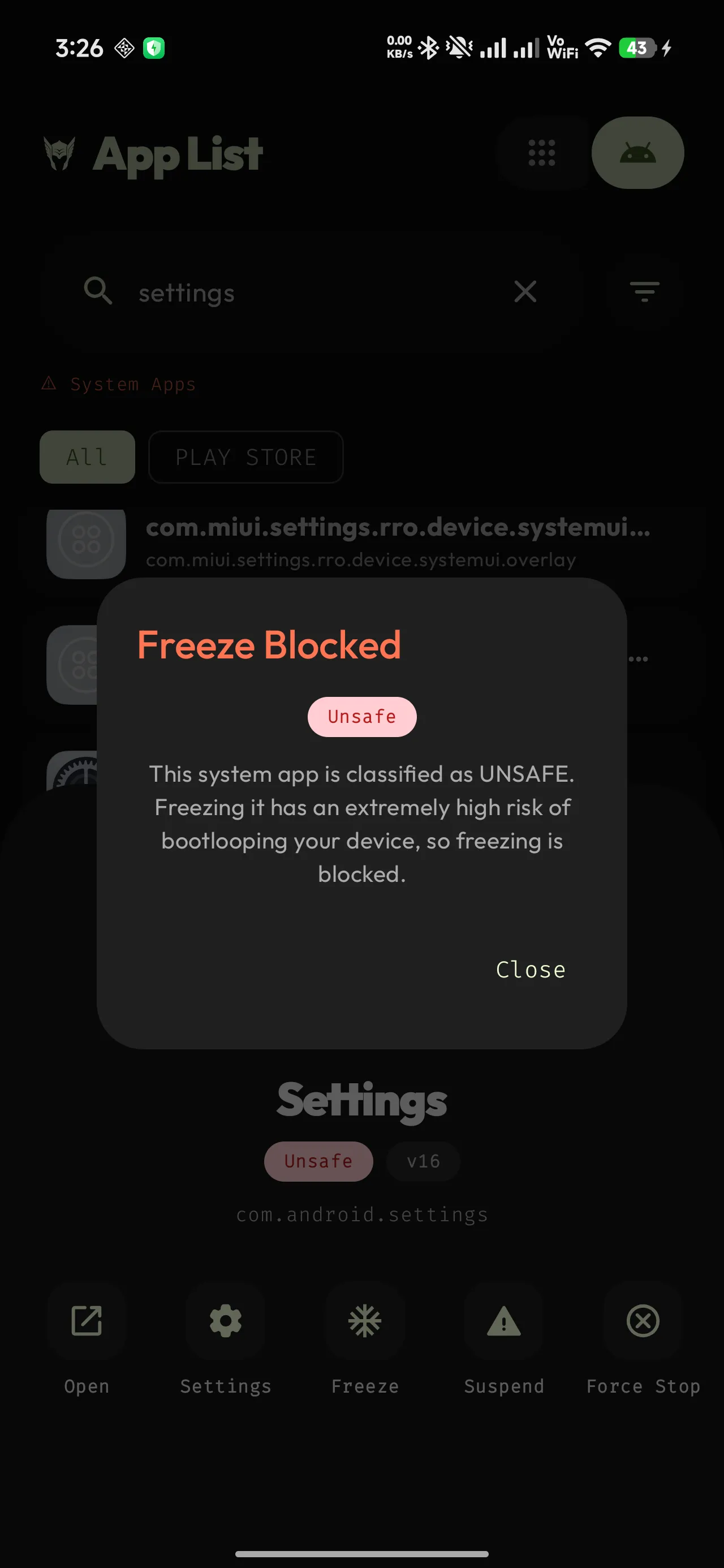
Thor bundles the Universal Android Debloater package database and consults it before any freeze or uninstall of a system app:
| UAD rating | What Thor does |
|---|---|
| Recommended | Proceeds normally |
| Advanced | Proceeds normally |
| Expert | Loud warning dialog; you can continue |
| Unsafe | Blocked outright — no override anywhere in the app |
| Not listed | Proceeds normally |
The gate is enforced at all six places a freeze can start: single-app tap, adding to the watchlist, batch runs, profile runs, auto-freeze, and batch uninstall. It fails closed — if the UAD data cannot be read at all, every system app is treated as Unsafe and blocked rather than waved through.
Unfreezing is never gated. That is deliberate: if a failed UAD load blocked unfreezing too, one bad data file would strand every frozen system app on the device.
Getting things back
- User app, frozen — always recoverable, no data loss.
- System app, frozen — usually switched off in place. With Shizuku’s removal fallback, it can instead be removed for the current user while data files remain; Unfreeze reinstalls it. Accounts managed by that app may still be affected. If the selected mode cannot freeze it, Thor reports failure and leaves the app active.
- System app, debloated — recoverable with
pm install-existing, as long as the APK is still on the system partition. It is the same file that shipped with your phone, so this is the normal case. - The one real trap — an app suspended in one privilege mode cannot always be unsuspended in another. Android only lets the package that suspended an app lift that suspension, and the three engines register under different identities. If you suspend under Root and later switch to Shizuku, those apps may be stuck; switching back and unsuspending there clears it. Root’s unsuspend already clears several known identities, while Shizuku’s and Dhizuku’s clear only their own. This is a known limitation with an open follow-up. The candidate fix is to have every unsuspend path clear all known suspender identities, but no approach has been settled on and no release carries it yet.
Component control
One level below the Freezer. Freezing switches off a whole app; this switches off a single piece of one — one activity, service, broadcast receiver or content provider out of the many an app declares. The app stays installed, launchable and, as far as it can tell, untouched.
The four sections on an app’s App Details screen list what it declares, each with a count: Activities, Services, Broadcast Receivers and Content Providers. Every row is individually actionable.
What a row offers
- Open or Force open — never both, and which one appears is decided per row rather than by
which button you press. An activity that is exported and carries no
android:permissionis reachable with an ordinarystartActivity, so Thor uses one: no shell, no privilege, and the app sees a normal caller. Anything unexported, or guarded by a permission Thor does not hold, is Force open and goes through the privileged path. Force open is also the answer when an exported activity refuses an ordinary launch — a frozen or suspended app, for instance. - Stop now — on a service that is running.
- Disable and Enable, the core of the feature.
- Reset to default — removes the override entirely rather than asserting “on”. This is what to use on a component whose state something else set, where switching it on would be Thor stating a preference it was never given.
- Copy class name, because the fully-qualified name is what you need to search for anything.
- Forget — drops Thor’s record of a component without touching the component. Offered when the two have drifted apart.
Rows are badged with what is true of them: Restricted by Thor, Changed elsewhere,
Disabled, Not exported, Off by default. Only one privileged action runs at a time —
pm and am reach the same PackageManagerService state, and two disables racing on one package
can interleave into a write that loses one of them.
Why it needs root, precisely
Root, or a Shizuku started as root. Not a shell-mode Shizuku, not Dhizuku. This is the one place in Thor where “Shizuku” is not a single answer, so the app checks the uid its Shizuku service actually runs as rather than the transport.
- Setting component state is uid 0 only.
PackageManagerService.setEnabledSettinghas a carve-out permitting the shell uid to make package-level changes and explicitly rejecting anything that names a class:SecurityException("Shell cannot change component state for …"). ReachingIPackageManager.setComponentEnabledSettingby reflection instead of throughpmarrives at the same check with the same uid, so there is no fallback worth writing. - Force-opening is uid 0 only.
ActivityManager.canAccessUnexportedComponentswaives the export and permission checks for root and system alone, andSTART_ANY_ACTIVITYis a signature permission the Shell package does not declare on any release from 9 to 16. - Stopping a service is uid 0 only here. The platform would in fact let any uid stop an exported service, so a shell-mode Shizuku could stop some of them. That narrower path is deliberately not offered: it cannot be verified across OEMs, and a Stop button that silently does nothing on half the rows is worse than one that is honestly absent.
- Dhizuku is an empty case, not a partial one.
DevicePolicyManagerexposes no component-enabled API at all, and a Device Owner’s only launch-related privilege is a background-launch exemption, which is not an export waiver.
When one of those is in the way, the screen says which — “Changing components needs Shizuku started as root”, “Dhizuku cannot change individual components” — instead of showing a row of dead switches. An unreadable Shizuku uid resolves to not capable, because painting controls that throw on every press is the worse way to be wrong.
What Thor records, and what it deliberately does not know
Every disable is written to a local record so it can be found again. Two things about it are design decisions rather than details:
- The restore target is the manifest default read at the moment of the disable, not “on”. A component that ships disabled is restored to disabled. Switching it on would invent a state the app never had.
- Restoring writes
default-statewherever the manifest already says enabled, rather than an explicitENABLED. An explicit override is a real row inpackage-restrictions.xmlthat outlives the app update which removed the component, pins the component on if a later version ships it disabled on purpose, and reads as a deviation to anything auditing the device. Writing the default leaves the app exactly as its developer shipped it, with no trace Thor was ever there.
Thor only tracks what Thor changed. A component disabled by another tool shows its real state — read from the system on every open, not cached — but carries no Restricted by Thor badge and is untouched by Restore all.
The record is bookkeeping, not enforcement, and Thor treats it that way. An app update, another root
tool, a pm clear, or the app itself can put a component back; an app needs no permission to change
its own components’ state, and some do it as a matter of course. When Thor’s record and reality
disagree, the row says Changed elsewhere and offers Forget. If a disable succeeds but the
record of it cannot be written, Thor says that out loud too — the component is off either way, but
with no row to find it by, Restore all will never offer it back.
Restoring
Restore all is cross-app, not per-app. The button appears beside a count for the app you have open, which makes the scope worth stating twice: it restores every component Thor disabled in every app, and the confirmation dialog says so before anything happens. Reaching across apps is the entire point of keeping the record — a component switched off weeks ago in an app since forgotten is otherwise unfindable.
It is not, however, device-wide. The record is scoped to the Android user Thor is running in, so rows belonging to another user or a work profile are left alone.
A partial run reports “Restored 6 of 9” rather than choosing between calling that a success or a failure, and it leaves behind exactly the rows that did not fully complete. Pressing it again therefore retries those and nothing else; setting component state is idempotent, so a retry on an already-restored component costs nothing. A row counts as restored only when both the platform change and the record deletion land — so a component that was put back while its row could not be deleted is left on the list for another pass rather than counted. The number can never claim more than the screen shows.
Safety
This is the sharpest tool in Thor, and the only one that can break an app without the app ever appearing changed. A component that is not running is not an error the app can report — a feature can stop working with no message, or the app can crash on the path that needed it.
So Thor asks every time, and the “Don’t ask again” checkbox lasts only until Thor is killed. That is deliberate: a permanent answer disarms the warning forever on the strength of one tap that may have been a mis-tap, while a session covers the real use case — one sitting spent trimming several apps — and comes back for the next one.
Batch operations
Anything Thor does to one app, it does to many.
- Multi-select — long-press to enter selection mode anywhere in the app list or the Freezer.
- Batch actions — freeze, unfreeze, suspend, unsuspend, force-stop, clear cache, uninstall, Fix Store, share APKs and export. In the Freezer the selection can also be saved as a profile. Clear data and background restriction are single-app actions only.
- Live terminal log — most batch runs stream a real-time log that names each app with an X-of-Y counter, so you can see exactly which package failed instead of getting one summary toast. A clean run dismisses itself after two seconds; a run with failures stays open until you close it. Bulk freeze and unfreeze use a compact processed-of-total counter instead, which names no apps at all.
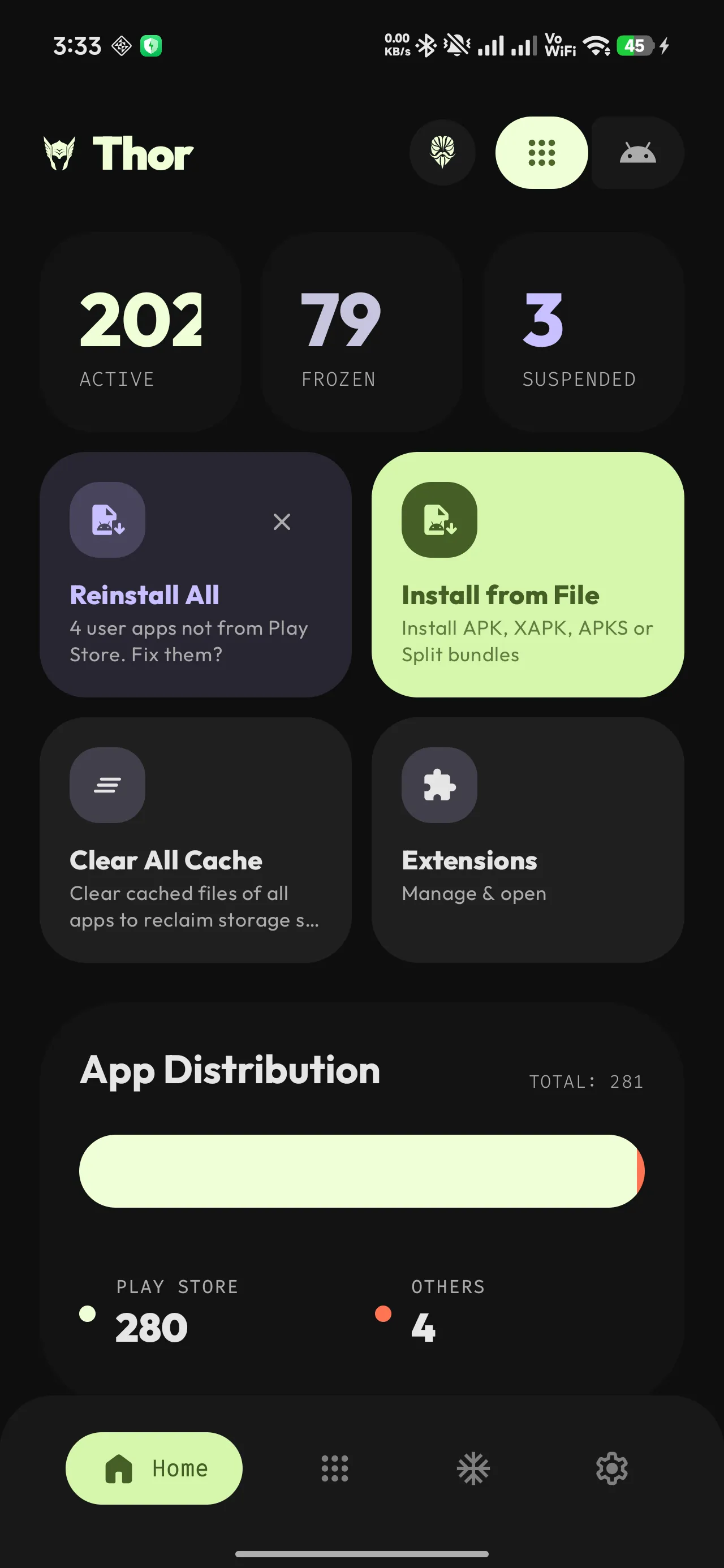
- Reinstall All — a home-screen card offering to re-attribute, in one pass, every user app whose installer record is neither Play nor Android’s own package installer. Dismissible.
- Concurrency and conflict handling — bulk freeze and unfreeze run five workers at a time. Starting a freeze while an unfreeze is running cancels the unfreeze first, rather than interleaving two contradictory operations. Multi-select batches from the app list run one app after another.
Blocked (UAD Unsafe) apps are filtered out before the total is counted, so the progress counter reflects what will actually be attempted.
App list, search and insight
Everything in this section works with no privilege at all. That is a selling point worth making loudly: install Thor, grant nothing, and it is still a better app browser than Settings.
Fast by construction
App metadata lives in a local Room database, so the list is on screen immediately at launch instead
of waiting on a full PackageManager scan. A background reconciler diffs installs, uninstalls and
updates, then applies surgical changes. Install sizes are cached so the expensive storage query does
not repeat.
Icons get the same treatment: the full-resolution icon is written to disk once, keyed by package, and
later loads decode that file in two passes down to the size actually being drawn instead of asking
PackageManager to render the icon again — unless the app has been updated since the file was
written.
Finding things
- Search as you type, matching both display name and package name.
- Sort by name, size, install date, last updated, version code, version name, target SDK or minimum SDK. Each one is reversible.
- Filter by:
- Source — chips generated from the installers actually present on your device (Play Store, F-Droid, sideloaded, and so on).
- State — active, frozen, suspended.
- Permission — every runtime permission group present on the device, so you can ask what here can request your camera. Permissions the platform does not treat as dangerous have no group and no chip.
- Grid or list, remembered separately for the app list and the Freezer.
Status at a glance
Chips and icons mark apps that are frozen, suspended, split-APK installs, debuggable builds, and packages UAD flags as bloat. A system app removed for your Android user also shows the frozen chip: Thor folds the installed flag into the same state. Both an explicit system-app uninstall and a Shizuku-assisted freeze using the configured removal fallback can leave it there. The system APK remains on the device partition; the chip alone does not show which action removed it.
Home dashboard
Live counts of active, frozen and suspended apps, plus anything from an unknown installer; an install-source distribution chart; the current privilege mode; and quick-action tiles.
Unified app info sheet
Tap any app anywhere and the same sheet appears: icon, name, package, size, status chips, and the actions valid for that app in your current privilege mode. Frozen apps offer to thaw and launch in one tap, so you never land on the “app paused” dialog by accident.
Extensions
Thor can be extended by separate, signed APKs. This is the only Thor feature that uses the network,
and only when you open it — the store build additionally links Google Play Billing, which
connects to Play on its own. The extensions policy has the full terms.
- In-app store — browse a catalog of published extensions with author, version, description and verified or LSPosed badges.
- Verification chain — every downloaded extension passes a fixed sequence of checks before it can even reach the installer: the URL must be non-empty, it must be HTTPS, its host must be one GitHub actually serves releases from, the APK is streamed to disk while its SHA-256 is computed, that hash must match the catalog whenever the catalog pins one, and the APK’s signing certificate must match Thor’s pinned RSA-4096 key. Only then is it handed to the installer. The signer is checked again every time an extension is loaded.
- Update detection — compares the installed version code against the catalog and offers updates.
- Per-extension storage — each extension gets an isolated key-value store; extensions cannot read each other’s data.
- Consent gate — the Extension Manager is locked behind a one-time disclaimer you have to actively acknowledge, including a small arithmetic check, so it cannot be tapped through.
- Source-only entries — extensions published without a binary show “build it yourself” and have no install button.
Extensions that fail the signature check are listed but never loaded, and provide no functionality.
Personalisation and security
| Feature | Notes |
|---|---|
| Asgardian theme | Thor’s own palette: green on near-black, a terminal aesthetic. The default. Ships in dark and light. |
| Material You | Optional wallpaper-derived colours. Android 12 and newer. |
| Dark, light or system | Applied instantly, no restart. |
| AMOLED mode | Forces true #000000 backgrounds. Dark theme only — it has no effect in light. |
| Adaptive layout | Bottom bar on phones; navigation rail from 600 dp; two-pane list-detail at 840 dp and above. Landscape phones get their own layout. |
| Grid or list | Remembered independently per screen. |
| In-app language | Switch Thor’s language without changing the device language. |
| Biometric lock | Optional lock over the whole app — nothing inside is visible until you authenticate. |
The biometric lock, precisely
It gates app launch, not individual actions, and the session lasts until the process ends. What counts as authentication depends on your Android version. Android 11 and newer accept a strong biometric or your PIN, pattern or password. Android 10 accepts a weak biometric or a device credential. Android 9 accepts a biometric only, because the API 28 prompt has no device-credential path at all — a screen lock on its own will not unlock Thor there.
Thor refuses to arm the lock on a device that cannot satisfy it and tells you exactly what is missing. If a restored backup ever brings the setting back to a device where nothing you could enrol would satisfy the prompt — API 28 with no biometric sensor is the case that exists — Thor turns the lock off itself rather than locking you out. Where enrolling a fingerprint or a screen lock would fix it, the lock stays armed and Thor sends you to enrol instead, because silently dropping a lock you can still open would be a downgrade.
Trust, licence and distribution
- GPL-3.0-or-later. The full source is the app: no proprietary blob, no hidden module.
- No ads, no trackers, no telemetry, no analytics SDK. Verifiable in Thor’s own code: exactly one
file opens a network connection, and it is the extension store. The
storebuild links Google Play Billing on top of that; thefossbuild ships a no-op stub in its place. QUERY_ALL_PACKAGESis used for the one thing Thor exists to do — list your installed apps.INTERNETis declared for the extension store, and the manifest comment directly above it says so. Thor’s own code uses it when you open the Extension Manager and at no other time.
Where to get it
| Channel | Build |
|---|---|
| Google Play | store flavour |
| IzzyOnDroid | foss-release.apk |
| GitHub Releases | foss-release.apk |
Thor is not in the main F-Droid repository yet. IzzyOnDroid is a separate repository you add to an F-Droid client, which is a common point of confusion and not something this page will blur. An F-Droid listing is planned. The download page has the details for each channel.
What differs between foss and store: in what the app does, the Support Developer flow. The
store build carries Google Play Billing; the foss build ships a no-op stub with billing
permanently unavailable and opens the donation links in a browser instead. The packaging differs too:
foss takes a -foss version-name suffix and an extra ProGuard rules file, while the benchmark
build type exists only for store. The locale filter that used to be one of these is now applied to
every variant, so both builds carry the same eight locales — see the
download page for why the Play build stopped using per-locale splits. Every
app-management feature is the same code in both.
Reproducible builds
The foss variant is built to be reproducible, and IzzyOnDroid rebuilds it from this source to award
its reproducibility badge. That is their check, not my claim. What Play distributes cannot be checked
the same way: CI uploads an app bundle rather than an APK, so Play generates and signs the device
APKs itself and there is no file of mine to compare against. Baseline profiles are deliberately kept
out of the build entirely, because they change the emitted bytecode and would break that
verification.
Supporting development
Thor is written by one person. Nothing here unlocks a feature, removes a limit or changes the app in
any way. The store build lists four Play subscription tiers alongside the links below; they are
donations too, and they unlock nothing either.
- GitHub Sponsors — preferred: lowest fees, and it sits next to the code
- Ko-fi
- Patreon
- Buy Me a Coffee
- PayPal
The in-app support sheet offers three of these — GitHub Sponsors, Patreon and PayPal — in both
the foss and store builds. Ko-fi and Buy Me a Coffee are web-only on purpose: a page can afford
five near-identical rows, and a bottom sheet the user opened to do one thing cannot.
Forks
Thor’s name and logo are trademarks; the code is free to fork, the identity is not. An unofficial build carrying Thor’s name could contain anything.